
Why Animal Hospitals in San Diego Experience Slow Systems During Busy Hours
April 24, 2026
Nonprofit IT Budget Planning and How to Control Technology Costs

A nonprofit IT budget should account for the technology your organization uses every day, the equipment it will eventually need to replace, and the security measures required to protect its information. Without a clear plan, software renewals, aging computers, and unexpected technical problems can create expenses that compete with program funding.
For executive directors, finance managers, and operations leaders, the challenge is determining which technology costs are essential, which can be reduced, and which investments should be scheduled in advance.
A well-structured budget makes these decisions easier. It helps leadership understand total technology spending, prepare for future requirements, and maintain reliable systems without unnecessary expenses.
This guide explains what to include in a nonprofit IT budget, how to calculate annual costs, and where organizations can find opportunities to control spending.
Table Of Contents:
What Should a Nonprofit IT Budget Include?
How Much Should a Nonprofit Budget for Technology?
How to Build an Annual Nonprofit IT Budget
A Practical Nonprofit IT Budget Example
Hidden Technology Costs Nonprofits Often Overlook
How to Reduce Nonprofit IT Costs Without Creating New Risks
Common Nonprofit IT Budgeting Mistakes
When Should a Nonprofit Request a Professional IT Cost Review?
What Should a Nonprofit IT Budget Include?
Technology expenses often appear across several departmental budgets. Accounting may pay for financial software, development may manage a donor database subscription, and administration may purchase computers or arrange IT support.
As a result, leadership may not have a complete picture of what the organization spends on technology.
A nonprofit IT budget should include the following categories.
| Expense Category | What to Include | Budget Type |
|---|---|---|
| IT support and management | Technical support, maintenance, system administration, and vendor coordination | Recurring |
| Cybersecurity | Email protection, device security, access management, and security monitoring | Recurring and project-based |
| Software and cloud services | Microsoft 365, accounting software, donor management systems, and other subscriptions | Recurring |
| Computers and equipment | Laptops, desktops, servers, and network equipment | Planned replacement |
| Internet and connectivity | Business internet, wireless networks, and related services | Recurring |
| Data backup and recovery | Backup services, storage, recovery planning, and testing | Recurring and project-based |
| Technology projects | Cloud migrations, office relocations, major upgrades, and new applications | One-time |
The distinction between recurring expenses and planned purchases is important.
Monthly subscriptions and IT support are relatively straightforward to forecast. Equipment replacements and major projects require separate planning, even when they will not occur until later in the budget year.
Nonprofits should also identify which expenses are paid centrally and which are charged to individual departments or programs. This helps prevent overlooked subscriptions and duplicate budget entries.
How Much Should a Nonprofit Budget for Technology?
There is no universal IT budget percentage that works for every nonprofit.
An organization with 10 office employees and cloud-based applications may have very different requirements from one operating multiple facilities, maintaining specialized databases, or supporting staff who work directly with clients.
The 2025 NTEN Equity Guide for Nonprofit Technology recommends that organizations budget approximately 3% to 5% of their annual operating expenses for technology.
This is a planning recommendation, not a mandatory spending requirement or a figure that reflects every nonprofit's actual expenses.
For illustration, a nonprofit with a $1 million annual operating budget would have a technology allocation of $30,000 to $50,000 using that range.
However, the appropriate amount depends on the organization's circumstances.
Factors that influence nonprofit technology spending include:
- Number of employees and devices: More users generally require additional equipment, software licenses, and technical support.
- Software requirements: Fundraising, accounting, case management, and specialized program applications can represent significant annual expenses.
- Equipment condition: Organizations with aging computers or network infrastructure may need a larger replacement allocation.
- Security requirements: Sensitive donor, financial, employee, or client information may require additional safeguards.
- Number of locations: Multiple offices can increase connectivity, equipment, and support costs.
- Existing IT arrangements: Internal IT employees, outsourced support, and individual service vendors create different expense structures.
A nonprofit that recently upgraded its systems may have relatively stable technology expenses. Another organization that has postponed equipment replacement may require additional funding during the next budget cycle.
The most useful approach is to calculate actual operating requirements first, then compare the result with the organization's available resources and financial priorities.
How to Build an Annual Nonprofit IT Budget
An effective technology budget begins with understanding existing expenses and identifying what the organization will need over the next 12 months.
1. Inventory Your Technology
Start by documenting the equipment, applications, and services your nonprofit currently uses.
Include computers, laptops, servers, network equipment, cloud subscriptions, donor management systems, accounting software, and backup services.
For each item, record:
- Vendor or service provider
- Responsible department
- Current cost
- Renewal or replacement date
- Number of users or devices
- Whether the service is still required
This inventory establishes a reliable starting point and can reveal subscriptions that are no longer necessary.
2. Calculate Recurring Expenses
Identify every technology cost that repeats monthly, quarterly, or annually.
Common examples include IT support, Microsoft 365 licenses, donor database subscriptions, internet connectivity, cybersecurity services, and data backups.
Convert each expense into an annual amount.
Review renewal dates and known pricing changes, particularly for subscriptions purchased by individual departments.
3. Plan Equipment Replacement
Review the condition, performance, and support status of existing computers and network equipment.
Determine which devices should be replaced during the upcoming year and which can remain in service.
Replacement decisions should consider reliability, security updates, compatibility with current software, and employee requirements.
A documented replacement schedule allows organizations to spread equipment purchases across budget periods instead of waiting for multiple devices to fail.
4. Include Security and Recovery Costs
Cybersecurity and data recovery should have defined budget allocations.
Nonprofits may maintain donor information, financial records, employee data, and confidential program information. Protecting these records requires appropriate safeguards.
Budget for necessary email security, device protection, multifactor authentication, access management, and backup services.
Leadership should also understand how critical systems would be restored after equipment failure, accidental deletion, or a security incident.
5. Evaluate IT Support Expenses
Determine who handles technical problems, system maintenance, software administration, and vendor communication.
In some nonprofits, these responsibilities fall to an office manager or another employee whose primary role is unrelated to IT.
Although this arrangement may appear inexpensive, time spent troubleshooting technology reduces the time available for administration, fundraising, and program activities.
When comparing support options, consider the scope of services, security coverage, response arrangements, and predictable monthly costs.
For organizations evaluating outsourced support, managed IT services for nonprofits can provide a structured way to budget for ongoing technical assistance.
6. Prioritize Technology Investments
Once the expenses are documented, separate them into three groups.
- Essential operating expenses cover the systems, support, and security required to maintain current operations.
- Planned improvements include equipment replacements, network upgrades, and other projects that address identified needs.
- Future initiatives are projects that may benefit the organization but can be scheduled after immediate requirements are addressed.
This gives leadership a practical basis for making spending decisions when available funding is limited.
A Simple Nonprofit IT Budget Formula
Use the following calculation when preparing your annual technology budget:
Annual IT Budget = Recurring Technology Expenses + Planned Equipment Replacements + Approved IT Projects + Contingency Allocation
The contingency allocation provides room for unplanned technology expenses. Its size should reflect the organization's equipment condition, operational risks, available reserves, and financial circumstances.
A Practical Nonprofit IT Budget Example
Consider a hypothetical San Diego nonprofit with 20 employees, one office, cloud-based email, a donor management platform, and standard accounting applications.
The organization wants to establish an annual budget covering recurring services, planned equipment purchases, and unexpected expenses.
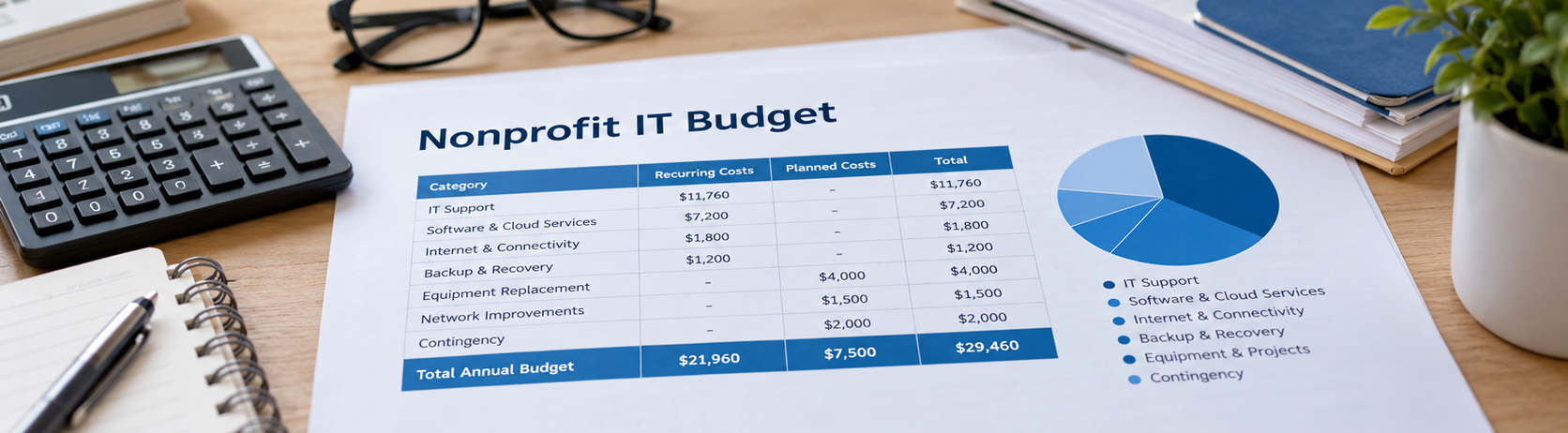
The following figures demonstrate how a budget could be structured.
Important: Except for the managed IT calculation based on Secure Networks ITC's stated nonprofit rate, all amounts are hypothetical examples selected to illustrate the budgeting process. They are not market averages, vendor quotes, or recommended spending levels.
| Expense Category | Illustrative Annual Cost |
|---|---|
| Managed IT support | $11,760 |
| Microsoft 365 and other software licenses | $3,000 |
| Donor management software | $2,400 |
| Accounting and administrative applications | $1,800 |
| Internet connectivity | $1,800 |
| Additional backup or recovery services | $1,200 |
| Planned computer replacements | $4,000 |
| Network equipment improvements | $1,500 |
| Contingency allocation | $2,000 |
| Total Annual IT Budget | $29,460 |
Understanding the Managed IT Support Calculation
Secure Networks ITC provides nonprofit managed IT support with advanced security for $49 per user per month.
For 20 covered users:
20 users × $49 × 12 months = $11,760 annually
This calculation establishes the managed IT support expense at the stated rate. Software licenses, hardware, internet service, projects, and other separately required services must be evaluated according to the organization's actual needs.
The hypothetical budget also distinguishes between two types of spending:
- Recurring services: $21,960 annually
- Planned equipment, projects, and contingency: $7,500 annually
This distinction helps nonprofit leaders understand which expenses will continue each year and which depend on scheduled purchases or specific requirements.
How to Use This Example
Replace the hypothetical figures with actual vendor invoices, subscription costs, equipment estimates, and planned projects.
A working spreadsheet should contain the expense category, current annual cost, projected annual cost, renewal or replacement date, and responsible department.
Review the completed budget with department managers to identify expenses that may have been overlooked.
The objective is to establish a realistic budget for your own organization.
Hidden Technology Costs Nonprofits Often Overlook
Some of the most expensive technology problems begin with costs that were never included in the budget.
Unused Software Licenses
Employees and volunteers may leave the organization while their paid subscriptions remain active.
Regular account and license reviews can identify services that are no longer required, provided important organizational records and access are properly preserved.
Automatic Renewals and Price Increases
Subscriptions may renew before anyone evaluates whether the service is still necessary or whether pricing has changed.
Assign responsibility for reviewing agreements before renewal dates.
Emergency Equipment Purchases
When unsupported or unreliable equipment fails, the nonprofit may need to purchase replacements immediately.
Urgent purchases can also create installation costs and disrupt employees who depend on the affected systems.
A planned replacement schedule reduces reliance on emergency purchasing.
Employee Time Lost to IT Problems
Repeated email issues, slow computers, unreliable connectivity, and software problems consume employee time.
These costs may not appear on an IT invoice, but they can affect productivity, administrative work, and program delivery.
Unclear Vendor Responsibilities
Organizations sometimes maintain separate agreements for software support, networking, cloud services, and technical assistance.
When responsibilities overlap or are unclear, troubleshooting may require additional coordination and unexpected service charges.
Reviewing vendor agreements helps leadership understand what is covered and which services are billed separately.
How to Reduce Nonprofit IT Costs Without Creating New Risks
Effective cost control focuses on eliminating unnecessary spending and improving purchasing decisions while maintaining essential systems and safeguards.
Review Nonprofit Software Discounts
Eligible nonprofit organizations may qualify for software grants or discounted subscriptions.
Microsoft, for example, provides nonprofit licensing options for qualifying organizations. Available benefits depend on eligibility, plan selection, and current program terms.
Review assigned licenses and determine which features employees actually require.
Some users may need advanced capabilities, while others may be adequately served by a different plan.
For current eligibility requirements and available programs, consult Microsoft for Nonprofits.
Eliminate Overlapping Services
Review cloud storage, backup subscriptions, security tools, and other applications for duplicated functions.
Before removing a service, confirm that its necessary features, security protections, and retention requirements are covered elsewhere.
Standardize Equipment Purchases
Using a consistent range of suitable business computers can simplify purchasing, maintenance, and replacement planning.
Equipment should still be selected according to employee responsibilities and application requirements.
The lowest purchase price does not necessarily represent the lowest long-term cost.
Establish a Software Approval Process
Require new subscriptions to be reviewed for cost, compatibility, security, and ongoing support requirements.
This helps prevent departments from purchasing overlapping tools or introducing applications that create additional administrative expenses.
Compare the Full Cost of IT Support
When evaluating IT support arrangements, consider what is included in the agreement.
A lower monthly fee may exclude important maintenance or security responsibilities. Other arrangements may require multiple vendors to support the same environment.
Compare the total expected annual cost and the responsibilities covered rather than focusing exclusively on the advertised price.
Common Nonprofit IT Budgeting Mistakes
Several budgeting practices can create avoidable expenses or leave organizations unprepared for necessary investments.
- Budgeting only for purchases: Equipment and software require ongoing support, maintenance, and security after implementation.
- Delaying necessary replacements: Continuing to use unreliable or unsupported equipment can increase downtime and emergency expenses.
- Overlooking data recovery: Paying for backup storage does not guarantee that critical systems can be restored within an acceptable timeframe.
- Failing to track renewals: Unused subscriptions and price changes can go unnoticed when no one is responsible for reviewing agreements.
- Separating technology decisions by department: Independent purchases can create duplicate subscriptions, inconsistent security practices, and incomplete financial reporting.
- Ignoring ongoing project costs: A new application may require additional licenses, support, integrations, or equipment after implementation.
These problems can often be reduced through annual planning, clear purchasing responsibilities, and periodic reviews of technology expenses.
When Should a Nonprofit Request a Professional IT Cost Review?
An outside review can be useful when leadership needs a clearer understanding of existing expenses or upcoming technology requirements.
Consider requesting a review when:
- Your organization is preparing its annual budget without a complete technology inventory.
- Multiple departments purchase software independently.
- Computers or network equipment are approaching replacement.
- Employees regularly experience technical problems.
- The nonprofit is considering managed IT support or changing vendors.
- New programs, offices, or staffing increases will affect technology requirements.
- Leadership is uncertain whether current cybersecurity and backup arrangements are adequate.
A professional review can help identify recurring costs, equipment requirements, support responsibilities, and areas where improvements should be prioritized.
Secure Networks ITC provides nonprofit IT services in San Diego, including technical support, cybersecurity, cloud services, and infrastructure planning.
Frequently Asked Questions
Get a Clearer Picture of Your Nonprofit's IT Costs
A reliable nonprofit IT budget gives leadership a clear understanding of current technology expenses, upcoming requirements, and opportunities to control unnecessary spending.
By reviewing existing subscriptions, planning equipment replacements, accounting for cybersecurity, and evaluating support arrangements, organizations can make technology decisions that support reliable operations and responsible financial management.
Secure Networks ITC helps San Diego nonprofits review their technology environments, identify infrastructure needs, and evaluate ongoing support expenses.
With 20 years of experience and Microsoft Certified Partner expertise, our team helps organizations make informed technology decisions based on their operational priorities and budget requirements.